Comparison
Grais vs Gemini (2026)
Grais vs Gemini, checked September 2026. Gemini in Chrome now sits in a side panel on the open tab. Grais drafts inside the signed-in messaging thread.
- Facts checked
- September 17, 2026
- Rows compared
- 11
- Sources cited
- 8
The short answer
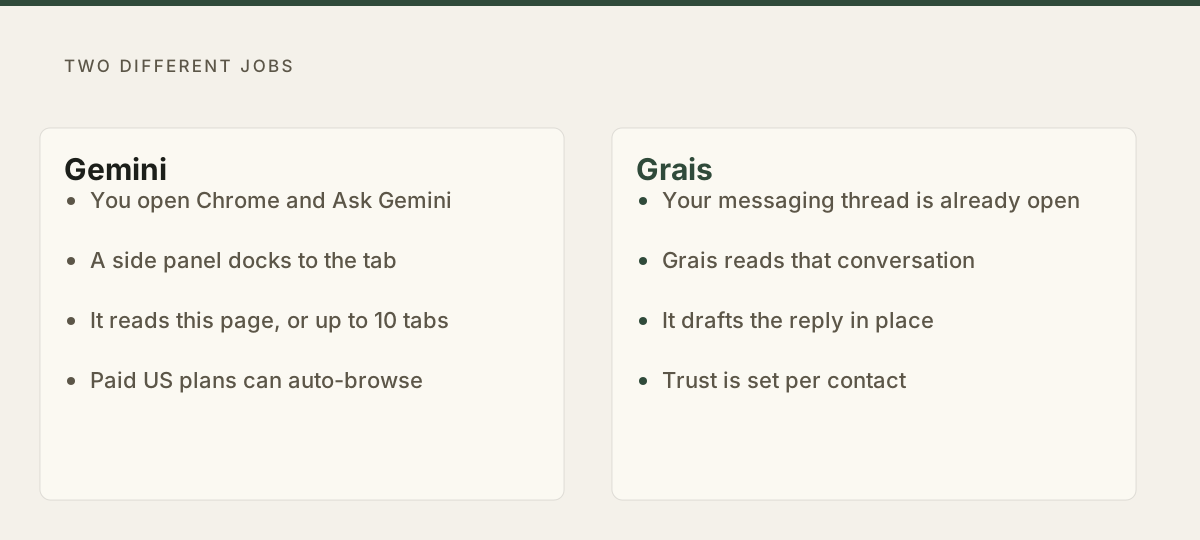
Gemini in Chrome now lives in a side panel next to the open tab. It reads that page, can share up to 10 tabs, and on paid US plans can auto-browse. Grais drafts the reply inside the messaging thread. Pick Gemini to work on the page. Pick Grais when the work is the reply to a specific person.
- Pick Gemini when
- Pick Gemini in Chrome if you want a side panel that reads the current tab, compares across pages, and can auto-browse on a paid US plan.
- Pick Grais when
- Pick Grais if the work is the reply in a WhatsApp Web, Telegram, LinkedIn, Instagram or Tinder thread, with memory of that person and a send-trust level you set.
Side by side
Gemini vs Grais, row by row
Rows won
- Gemini
- 5
- Even or not scored
- 1
- Grais
- 5
| Comparing | Gemini | Grais |
|---|---|---|
| Side panel on the open tab | Yes Chrome Enterprise help says Gemini in Chrome lives in a side panel and uses the open tabs. You can dock it or pop it out. Edge: Gemini | Partial Grais is a Chromium extension on the messaging thread, not a general Chrome side panel on every site. |
| Entry price | Yes The Chrome side panel is rolling out without a paid Google AI plan. Auto browse needs Pro or Ultra. Edge: Gemini | Partial Grais is invitation only. New accounts require approval; existing accounts keep their access. New purchases are paused. |
| Reads the current page and other tabs | Yes The current tab is shared by default. You can add up to 10 open tabs with @ or the tab picker. Edge: Gemini | Partial Grais reads the open WhatsApp Web, Telegram Web, Instagram, LinkedIn or Tinder thread, not arbitrary sites. |
| Auto-browse multi-step web tasks | Yes Auto browse can click, fill forms and navigate. Help says it needs to be 18+, in the US, on English, with Google AI Pro or Ultra. Edge: Gemini | Not a focus Grais drafts replies in supported chats. It does not book travel or fill forms across the web. |
| Gmail, Calendar and other Google apps from the panel | Yes Connected Apps cover Gmail, Calendar, YouTube, Maps, Shopping and Flights. The side panel can draft and send email. Edge: Gemini | Partial Grais reaches work tools through MCP and Skills, not a first-party Gmail compose window in Chrome. |
| Runs in Brave, Edge or Arc | No Gemini in Chrome is a Chrome feature on Mac, Windows, Chromebook Plus, and, in the US, Android Chrome. It is not a Chromium-wide extension. | Yes The Grais extension runs on Chrome, Brave, Edge and Arc. There is still no Firefox or Safari build. Edge: Grais |
| Drafts inside your signed-in web thread | No The side panel is a browsing assistant. Google does not document it as a composer inside WhatsApp Web, Telegram, LinkedIn or Tinder. | Yes The Chromium extension drafts inside WhatsApp Web, Telegram Web, Instagram, LinkedIn and Tinder. Edge: Grais |
| Memory keyed to a specific person | Partial Personal Intelligence for Chrome is described as coming in later months, and is opt-in context from Gemini chats and connected apps, not per-contact memory of your messaging partners. | Yes Memory is organised per relationship: who said what, and what matters to them. Edge: Grais |
| Remembers what you promised a named contact | No Google documents no commitment tracking tied to an individual counterparty in your messaging apps. | Yes Promise tracking keeps what you committed, and to whom, after the thread scrolls away. Edge: Grais |
| Send permission that changes per contact | No Auto browse asks you to confirm sensitive steps, with one rule for the task, not a trust ladder per person you message. | Yes Trust rises per contact from review, to voice approval, to known-safe autonomy. Edge: Grais |
| Best for | Yes Someone who wants a Chrome side panel that reads the page, compares tabs, and can auto-browse on a paid US plan. | Yes Someone whose real workload is replies to specific people in live web threads across five apps. |
Where they win
Where Gemini is the stronger pick
The Gemini that matters next to Grais now lives in Chrome, not in a separate tab. Chrome Enterprise help puts it in one sentence: Gemini in Chrome lives in a side panel and gives context-aware help from your open tabs. The consumer help page matches that. After you opt in, Gemini in Chrome is in the side panel. You can dock it to the tab or pop it out. The current page is shared by default. You can add up to 10 open tabs. That is a browsing assistant sitting beside whatever you are already looking at.
Google shipped that panel as the new default on 28 January 2026. The Chrome blog, by Parisa Tabriz, says Gemini in Chrome now opens in a side panel so you can keep the main tab and still compare reviews, summarise pages, or hunt for a slot on a messy calendar. It is a Chrome feature on Mac, Windows and Chromebook Plus, not an extension you install from the Web Store. Grais is an extension. On a Google-signed-in Chrome window, Gemini is already in the toolbar.
The panel also reaches the rest of Google. Connected Apps include Gmail, Calendar, YouTube, Maps, Shopping and Flights. The January blog walks through booking a conference flight from an old email, then drafting the arrival note without leaving the page. Nano Banana can transform an image in the current window from a prompt in the side panel. None of that is Grais work. If the job is the page, the tabs, or Gmail from the panel, Gemini wins.
Grais is invitation only. New accounts require approval; existing accounts keep their access. New purchases are paused.
The difference
What Grais does differently
A side panel that reads the page is not a reply in the thread. Gemini in Chrome summarises the tab, compares tabs, drafts Gmail, and on paid US plans walks the web. Google does not document it as a composer inside WhatsApp Web, Telegram Web, LinkedIn, Instagram or Tinder. Grais does that job. It reads the open conversation and drafts the next message to that person in your voice.
Claude in Chrome is the closer sibling on this hub: another side panel that reads the page. Gemini is first-party Chrome, not an extension, and it can auto-browse. That still leaves the same hole. The panel is about the document in front of you. Grais is about the person on the other side of the thread.
Memory points at the other person. Personal Intelligence for Chrome is described on the January blog as coming in later months, opt-in, and built from Gemini chats and connected apps. That is memory of you. Grais keeps memory per relationship: who said what, what was promised, what matters to that contact. The same person stays one relationship whether they wrote on WhatsApp, LinkedIn or Telegram.
Permission is granted per contact. Trust starts at review, moves to voice approval, and can reach known-safe autonomy. Auto browse confirms sensitive steps for the task in front of it, then applies the same pause to everyone. That is the right control for a web agent. It is the wrong control for a long-running chat with one human.
Grais is invitation only. New accounts require approval; existing accounts keep their access. New purchases are paused.
Also worth knowing
Other Gemini products, not this page
Magic Compose is still an on-device rewrite in Google Messages. The Gemini Android app can still send a WhatsApp it has not read. Those are real products and they are not the Chrome side panel. This page is the panel: Ask Gemini in the toolbar, docked beside the tab, optional auto browse on paid US plans.
What each costs
Pricing
Prices move. Each column prints the date those numbers were read, and links to a public page from the company itself. Where a company publishes no pricing page, the notes under its plans say where the numbers came from.
Gemini
As of September 17, 2026
- Gemini in Chrome$0
- The side panel is rolling out in Chrome without a paid Google AI plan. Availability is gradual and region-limited.
- Google AI Plus$4.99 / month
- United States price announced by Google on 8 June 2026, with 400 GB of storage and 2x Gemini-app access.
- Google AI Pro$19.99 / month
- Required, with Ultra, for auto browse. Help caps Pro at 20 multi-step auto-browse requests a day. 5 TB storage, 4x Gemini-app access.
- Google AI UltraFrom $100 / month
- Auto browse up to 200 multi-step requests a day. $100 is Ultra 5x. $200 is Ultra 20x, from Google I/O 2026.
- Gemini in Chrome is a Chrome feature, not a Google One SKU. The side panel is rolling out on its own. Auto browse is documented as Google AI Pro or Ultra, 18+, US, English, personal account.
- The live Google One plans page prints Plus, Pro, Ultra 5x and Ultra 20x, and localizes prices rather than baking a dollar amount into the markup.
- Plus $4.99 is the United States figure Google announced on 8 June 2026. Ultra $100 and $200 are the United States figures from Google I/O 2026. Pro $19.99 is the last published United States list price for that named plan; confirm the number on Google One for your account.
Grais
As of August 18, 2026
- Invitation onlyBy invitation
- New accounts require approval. Existing accounts keep their current access.
FAQ
Questions people actually ask
Where does Gemini in Chrome actually sit?
In a side panel. Chrome Enterprise help says Gemini in Chrome lives in a side panel and uses your open tabs. The consumer help page says that after you opt in, Gemini in Chrome is in the side panel, and you can dock it to the tab or pop it out. Click Ask Gemini in the toolbar, or use the keyboard shortcut. It is a Chrome feature, not a Web Store extension, and it is separate from the Gemini web app.
Can the Gemini side panel draft my WhatsApp or LinkedIn replies?
Not as a messaging assistant. It reads the current tab and up to 10 others, summarises, compares, drafts Gmail, and on paid US plans can auto-browse. Google does not document it as a composer inside WhatsApp Web, Telegram, LinkedIn, Instagram or Tinder. Grais drafts in those open threads instead.
Do I need a paid Google AI plan for the side panel?
Not for the panel itself. Help says Gemini in Chrome is still rolling out, on Chromebook Plus, Mac or Windows, signed into Chrome, age 13 or older in a supported region. Auto browse is the paid extra: 18+, US, English, personal account, Google AI Pro or Ultra, 20 multi-step requests a day on Pro and 200 on Ultra.
Is Gemini in Chrome the same as Claude in Chrome?
Same neighbourhood, different product. Both read the page from a side panel. Gemini is built into Chrome and can auto-browse on paid US plans, with Gmail and other Connected Apps. Claude in Chrome is a Web Store extension on paid Anthropic plans, Chrome only. Grais is the other job: the reply in the live messaging thread, including Brave, Edge and Arc.
Sources
- Gemini Apps help: Use Gemini in Chrome
- Chrome Enterprise help: Welcome to Gemini in Chrome
- Chrome blog: Gemini in Chrome side panel and auto browse, 28 January 2026
- Gemini Apps help: auto browse in Chrome
- Chrome blog: Gemini in Chrome on Android, 18 August 2026
- Google AI plans on Google One
- Grais pricing page
- Grais product page
Facts checked September 17, 2026. Gemini's features and pricing come from the public sources cited on this page. Gemini is a trademark of its owner and is named here only to identify the product being compared.